Gev gætur eftir tínum síðu

bestmenu.net/

Tín menyu, títt merki, fyri einki.
á netinum í fáum minuttum.

Skapa eina ókeypis merkju menyu og QR-kód síðu til tína matstovu, kaffihús ella bar — eingin app at byggja, eingin uppbyggjar at leiga. Legg til rættir, vel ein snið, og býtið tykkara leinkju. Legg til at bíleggja á netinum, tá ið tú ert klárur.
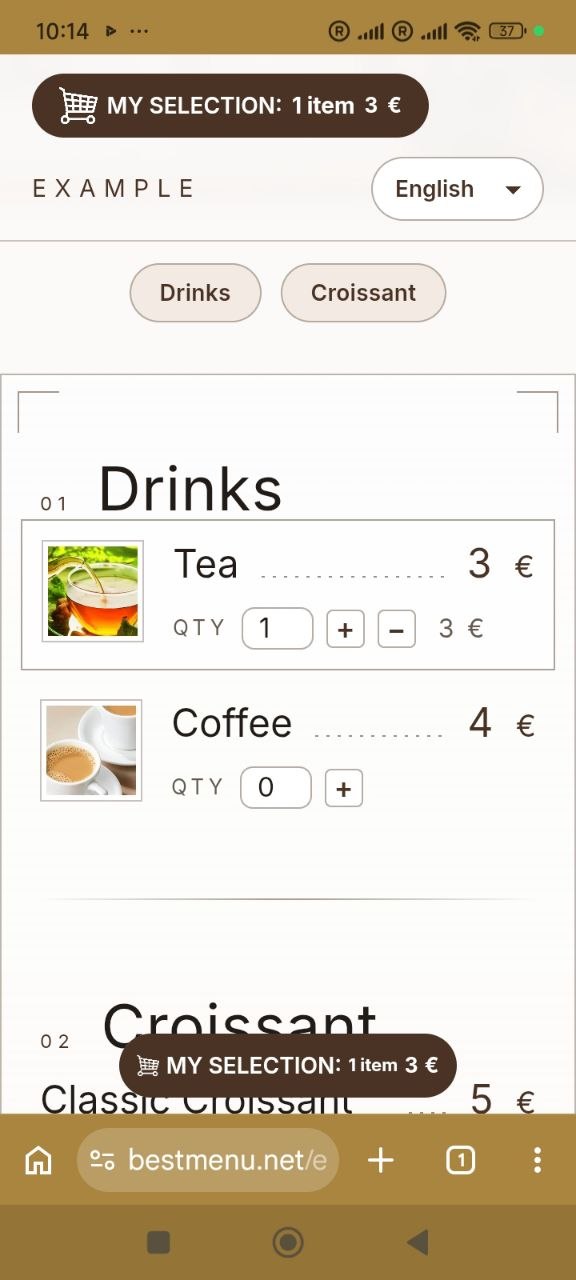
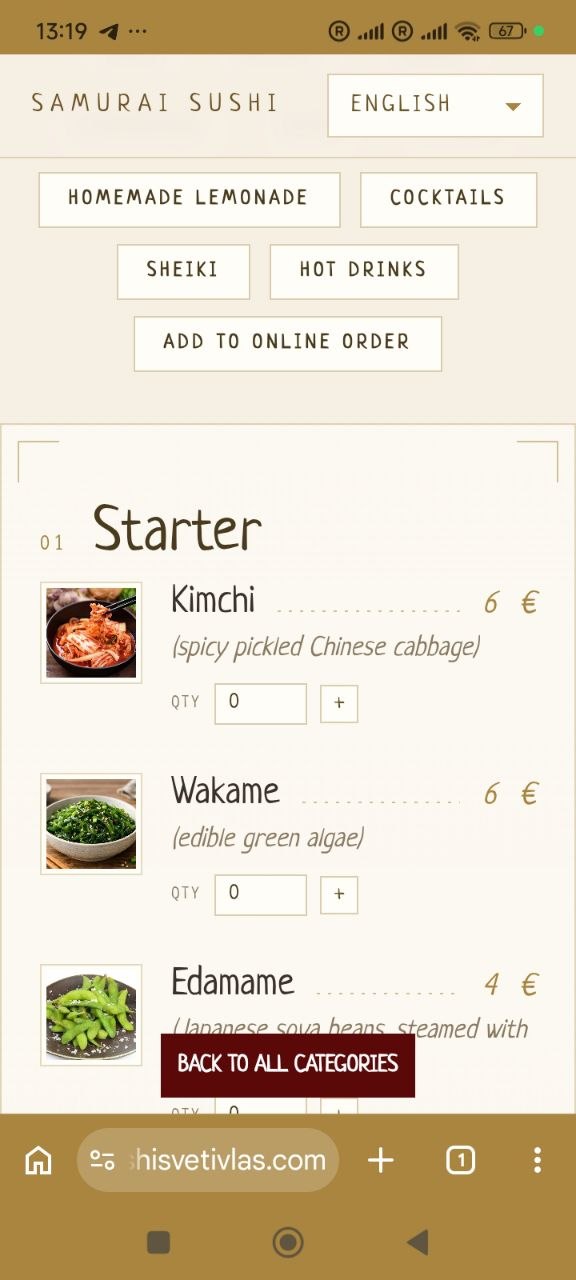
Møguleikar

Alt, sum tú hevur brúk fyri á menusíðuni

Frælsi at byrja

Gev út tína merkju menyu og QR-kód fyri einki. Legg til at bíleggja á netinum, tá ið tú ert klárur — eingin skuldbinding.

Matvøra í hvørjum máli

Tænka ferðafólki og lokalbeingum — skift mál beinanvegin, ikki hvør sær síður at viðlíkahalda. Fólk velja sjálvandi støð, sum tey kunnu lesa um í teirra egna máli, og tað kann fáa fleiri vitjandi til matstovuna.

Allergen labels

Tag each dish with any of the 14 allergens listed in Annex II of Regulation (EU) No 1169/2011 in one tap. Guests see clear icons and names right under the dish, so they can order with confidence.

QR-kód

Gæstir skanna QR-koden á teirra sæti og broyta fulla menynina beint á telefonina — ongar prentaðar menynur eru neyðugar.

Leivd & pickup

Gæstirnir fara at hyggja at menynum, byggja eina kurvu og bíleggja á netinum — klár at taka upp ella verða sendir til teirra hurð.

Sjálvvirkandi rokning av kurvaborði

Prísir, nøgdir og heildaruppdatering beinanvegin, tá ið gestirnir byggja sína koru — ongar handbøkur, ongar prísfeilir, og gestirnir vita altíð neyvt, hvat teir skulu gjalda.

Tín evni

Vel eitt design, sum samsvarar við títt merki.

Bráðfeingis boð

Hvør nýggj skipan landar í dashboardinum, tá ið hon verður sett, við einum ljóðvarni.

Skipað av Google Search

Menyn og matstovuuppgávur eru settar upp, so Google kann vísa tær beinleiðis í leitarúrslitunum — og hjálpa fleiri at finna teg.

Everything included

Everything your digital menu needs

Who it's for

Made for every kind of venue

Restaurants

Full menus with sections, photos and allergens, in the languages your guests speak.

Cafés & coffee shops

Change daily specials and prices in seconds, with nothing to reprint.

Bars & pubs

Drinks with volumes and prices, plus your Wi-Fi details right on the menu.

Pizzerias

Every pizza with a photo and a price, and pickup or delivery orders on the Pro plan.

Bakeries

Show allergens such as gluten, eggs and milk on every product.

Food trucks

One link and one QR code wherever you park, always showing today's menu.

Hotels & B&Bs

Breakfast, room-service and bar menus as sections of one page, behind a QR code in every room.

Delivery kitchens

Take pickup and delivery orders online with no commission on the Pro plan.

Hvussu tað virkar

Skapa tína egnu síðu í einum minutt.

Fá eina QR-kód til tína menyu í 10 sekund.

Legg eina mynd til menynuna í sekundum.

Skunda tær at redigera eina menyu.

Tag allergens on a dish in a few clicks.

1

Fylg títt merki

Fyll út títt merki, mál, samband og vel eitt tema.

Tað tekur umleið 5 minuttir

2

Legg til matskráina

Fáa inn tínar rættir, prísir og flokkar.

1 minutt fyri hvørt mál

3

Til reiðar

Dela tína leinkju ella QR-kód á sosialu, prenta hana á einum borðkorti og byrja at taka boð.

Tað tekur umleið 2 minuttir

Prísur

Byrja fyri einki. Uppgradera til at bíleggja á netinum.

Frítt

Tað er ikki neyðugt við einum kredittkorti

Frælsi fyri allar ævir

  • Málsíðu á netinum
  • QR-kód til borðini
  • Sjálvvirkandi rokning av kurvaborði
  • Matvøra í hvørjum máli
  • Umseting av handbúnaðarmenyu
  • Umseting av sjálvvirkandi menyu
  • Allergen labels (14 EU allergens)
FAQ

Frequently asked questions

What is BestMenu?

BestMenu is an online menu builder for restaurants, cafés, bars and food trucks. You get your own branded menu page with a QR code for your tables, menus in more than one language with automatic translation (one extra language on Free, any number on Pro) and, on the Pro plan, online ordering for pickup and delivery.

What is a QR code menu?

A QR code menu is your menu as a web page. Guests scan the QR code on the table with their phone camera and the menu opens in the browser, with no app to install. You update it online, and the same QR code always shows the latest version.

Which businesses can use BestMenu?

Restaurants, cafés and coffee shops, bars and pubs, pizzerias, bakeries, food trucks, delivery kitchens and hotels, for breakfast, room-service or bar menus. If you serve food or drinks, BestMenu works for you.

What is the difference between a digital menu and a paper menu?

A paper menu has to be reprinted every time a price or a dish changes. A digital menu is updated in seconds from your dashboard, shows photos and allergens, switches between languages and costs nothing to print. Guests open it by scanning the QR code on the table.

Why not just put a PDF menu behind a QR code?

A PDF is hard to read on a phone: guests have to zoom in and scroll sideways, and every change means making and uploading a new file. A BestMenu page is made for phones, shows every dish with its price, photo and allergens, and updates the moment you save.

Is BestMenu really free?

Yes. The Free plan has no time limit and doesn't ask for a credit card. It includes your branded menu page, a QR code for your tables, automatic basket calculation, and both manual and automatic menu translation.

What do I get with the Pro plan?

Pro includes everything in Free, plus online ordering and an order management dashboard. It costs €9 per month, billed monthly, with no long-term commitment.

Do you take a commission on orders?

No. Pro is a flat monthly price. Every order your guests place is yours, with no per-order fees from BestMenu.

Do my guests need to install an app?

No. Guests scan the QR code with their phone camera and your menu opens straight in the browser. It works on any modern smartphone.

Can I change my menu after printing the QR code?

Yes. The QR code links to your menu page, not to a fixed copy of the menu, so you can update dishes, prices, photos and descriptions as often as you like. Changes appear instantly and you never need to reprint.

Does my QR code ever expire?

No. Your QR code simply points to your BestMenu page, so it keeps working for as long as your page exists, on the Free plan too.

How do menu translations work?

Choose the languages you want to offer and BestMenu translates your menu automatically. You can then edit any translation by hand. Guests switch languages with one tap, so tourists and locals can both read your menu. The Free plan includes one extra language next to your main one; Pro has no limit.

Can I add photos of my dishes?

Yes. You can add a photo to any menu item in a few seconds, right from your dashboard.

Can I show allergens on my menu?

Yes. When you add or edit a dish, tap the allergens it contains. All 14 allergens listed in Annex II of Regulation (EU) No 1169/2011 are available, and they appear under the dish on your menu with an icon and a name, on the Free plan too.

Can I match the menu to my brand?

Yes. Pick a theme for your menu page and add your logo, contact details, address, opening hours, Wi-Fi details and links to your messengers and social media.

How will I know when a new order comes in?

New orders appear in your dashboard the moment they're placed, with a sound alert, so you can start preparing them for pickup or delivery right away.

How long does it take to set up?

A few minutes. Sign in with your Google account, fill in your restaurant details and add your dishes, about a minute per item. No technical skills or design work needed.

Can I see a live example before signing up?

Yes. Use the "See a live example" link at the top of this page to open a real BestMenu menu exactly as your guests would see it, then create your own page for free.

Will my menu show up in Google search?

Your menu page includes the structured data Google recommends for restaurants, so search engines can read your dishes, prices and location, which can help more people find you.

Samanbering

Okkara fyrimunir

Competitor details come from each company's own website or product listing. "Not listed" means we could not find it there.

Frítt QR-kód

Ókeypis á netinum QR-kódgenerator

Skapa eitt QR-kód fyri einki — eingin tilmelding, eingin teldupost, einki at seta upp. Set eina leinkju niðanfyri, ella eina heildarlista: Hvør linja verður sína egnu niðurtøkuliga kóða. Tað er ein ókeypis QR-kodgenerator uttan at melda seg inn, og ein skjótur alternativur til QR Code Monkey tá ið tú bert ynskir eina reina kodu og ein niðurlastarknapp, einki annað.

Your menu online in a minute

Free forever, no credit card. Add photos, allergens and translations whenever you like.

Eitt dømi um tað